
AngularJS, wherever we go this word is heard innumerous of times. There is no wonder in it being this famous, it helps developers to avoid repetitions of code, extends the HTML code What is it? What does it to? How does it work?
Let me answer these questions in a simple one word answers-
What is it? It is a JavaScript framework.
What does it to? It allows to write code in MVC (Model View Controller) . It has many features like data binding, dependency injection, directives, filters and many more.
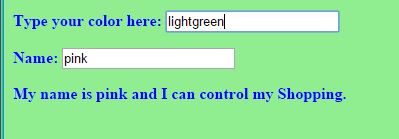
How does it work? Let us see how one of the features the data binding works and how can we change the color of a page.
Add AngularJS to a HTML page by giving the below link as src to the script tag:
http://ajax.googleapis.com/ajax/libs/angularjs/1.4.8/angular.min.js”
Now we need to learn about ng directives, it is AngularJS directives, which are used to load an app, controller, bind the data with HTML.
Let us discuss briefly about the directives used in this page color change app.
ng-app : ng-app helps to connect the AngularJS to the HTML. It can be given to HTML tag or any div tag and it can be defined using var appname = angular.module(‘appname’,[]); here appname is the name of the app and [] is for dependency injection, if it is empty then the app doesn’t have any dependencies.
ng-controller : ng-controller connects the controller to the HTML. It can be defined using appname.controller(‘controllername’, function(){}); . Here the controllername is the name of the controller and the function can be declared inside the controller as anonymous or can be declared outside with a name and pass the name to the controller.
This controller code can be written within a script tag or any new js file. This directive can be given to body tag or any div tag.
ng-model: This directive helps in databinding. This is a way to take the data from the HTML tags like <input> and bind it to a variable. Ex: <input type=”text” ng-model=”variablename”> . This data in ng-model can be passed using ng-bind.
ng-bind : The data stored in variable of ng-model can be passed in ng-bind. The alternative for this is expressions {{ }}.
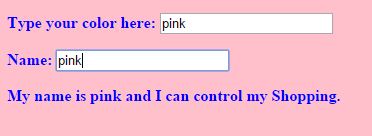
ng-init: This is used to initialize a variable. This can be passed in any html tag. In this example I initialized it to pink first.
The complete code for this app can be found here: https://github.com/sirishagavini/AngularJS–Changing-color-of-a-page
The output looks like –

 I~wiish