
Before we dive into the process of accessing JSON data using Restful services in AngularJS, lets look into the basics in brief.
What is a Web service? It is a service which makes all the resources available. The main terms come around when people talk about web services are REST and SOAP.
REST is a web architecture which usually deals with plain text, JSON and XML, It mostly uses HTTP protocol for communication. There are usually 5 methods used in this HTTP and are famously known as HTTP verbs – GET, PUT, POST, PATCH, DELETE.And REST is widely preferred because it has no web service definition.
REST vs Restful: The systems which are bound to REST terms are known as Restful.
SOAP is a protocol which deals only with XML data and is usually considered to be more secure when compared to other protocols. It depends on WSDL for web service definitions.
JSON: It is a format of data representation which is a collection of name-value pairs. It is easier for data exchange when compared to other data formats like XML.
So when we want access this JSON data using a Restful service we need use $http.get() method in a controller. My app and controller looks like below-
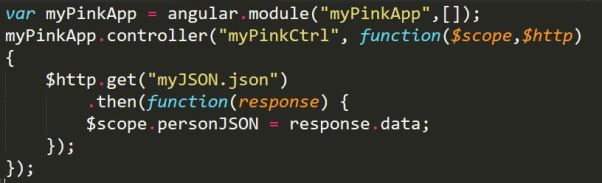
In the above screenshot, my module has no dependencies, hence the []. And it has a controller called ‘myPinkCtrl’.The controller takes two arguments $scope and $http, this $http makes use of one of its verbs called get to access the data from myJSON.json file(typically it is the url of the file you want to read) and also uses .then() method which returns a promise( we can also handle errors in this method) . So what ever .then() returns is stored in a variable called personJSON and it is bound by the $scope.
This completes the controller part, lets look into our JSON file, which looks like below screenshot.

As we know JSON hase name-value pairs, name & work are the name and their values are Sirisha & webdeveloper respectively.
The HTML file looks like the below screenshot,

The application is auto bootstrapped by using ng-app and the controller is mentioned by using ng-controller directive. The data is bidden using expressions i.e., {{ }}
The whole application can be found in this link: https://github.com/sirishagavini/Rest-Webservices-with-AngularJS
 I~wiish