
So, here is my quick beginner’s learning experience of AWS Lambda, S3 and API Gateway. Let’s start with AWS Lambda-
1. AWS Lambda: It lets you run code without the burden of managing servers. And absolutely no allows you to take the privilege of paying only for compute time you consume. (No charge when your code is not running).
So what is it? All it has are functions. It gives various option to create a function –
i) Author from Scratch: Allows you to write a function from scratch.
ii) Blueprints: Well as name suggests, it has few preconfigured templates to choose.
iii) Serverless Application Repository: Has already developed applications which can be used as it or configure them as per needs and deploy.
Let’s discuss in detail about Authoring from Scratch. The below options are going to be present when you begin creating a function –
Name: Lets you choose a name for Lambda.
Runtime: It lets you pick one from various languages in different version.
Role: Here one can set permissions to the function by confining access to AWS resources by creating an IAM Role or choosing one from existing roles(if they are already created for your IAM).
That’s it, your first AWS Lambda function creation would be complete with the above step.
Now, it allows you to configure you function and also Monitor it using CloudWatch Metrics. Let’s now look into configuration-
1) It allows to configure the function by adding a trigger(which lets you call/invoke your function). There are many options available in these trigger like below –
API Gateway, AWS loT, Dynamo DB, CloudFront, Cloud Watch Events, CodeCommit, S3 and many more.
2) Now adding muscle to your Lambda i.e., function code. Adding code can be done in 3 ways –
a) Adding inline code: It’s fine for a small length of code but not suggestible if your code is too long.
b) Uploading a .ZIP file: It allows you to upload your local .zip file and all it looks for is a handler.js (There is an option to configure your Handler name). And it is not suggestible if the file is larger than 10 MB.
c) Upload a file from Amazon S3: Here comes my favorite, as it supports larger files and allows to secure your code using various permission settings. All you need to do is create S3 buncket and add you file in it. the permissions set to you S3 buckets are defaulted to its content( if not specified while adding a file). It finally provides a link to your file, provide this link to Lambda function and then it imports the code from it and also allows you to edit it inline.
Testing your lambda there itself is possible by clicking the TEST button on top right corner. It allows to test in various events. If the code looks good on testing then you can save it using SAVE button.
Let’s do a basic example of inline code and coding structure in the part2!!

 I I I have used ng-switch to show only one data at a time, this is just like a switch case in java. And case is given ng-switch-when and the data given is shown here.




 animate(): This method helps in animating a set of selected elements. All these animations can be customized based on our interests. The syntax can be like: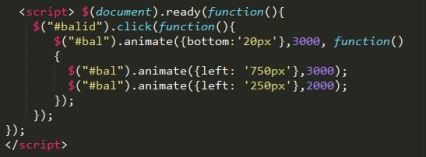





 I~wiish